
Text alerts
How people opt in to SierraWorks text alerts
The form, the consent wording and how to stop.
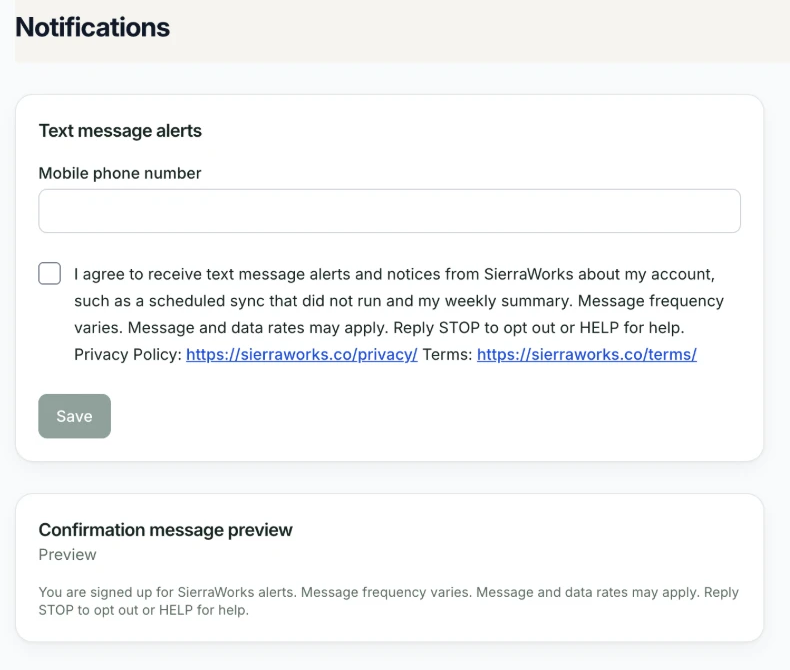
Administrators of client businesses and the SierraWorks owner opt in on this form inside their private SierraWorks account (Settings, Notifications). They enter their own mobile number and tick an unchecked checkbox before any text is sent.
The checkbox reads: “I agree to receive text message alerts and notices from SierraWorks about my account, such as a scheduled sync that did not run and my weekly summary. Message frequency varies. Message and data rates may apply. Reply STOP to opt out or HELP for help. Privacy Policy: https://sierraworks.co/privacy/ Terms: https://sierraworks.co/terms/” After saving, they receive one confirmation text: “You are signed up for SierraWorks alerts. Message frequency varies. Message and data rates may apply. Reply STOP to opt out or HELP for help.”
Reply STOP at any time to opt out, or HELP for help. You can also write to hello@sierraworks.co. See our Privacy Policy and Terms of Service.
Related Privacy Policy · Terms of Service
Questions about this page? Write to hello@sierraworks.co.